
The page you were trying to view is not available for your role.
Introducing a more secure and streamlined login
Our new login experience for the online Customer Centre and the Quilter app provides stronger security and an easier login experience.
It provides stronger protection for your account while making it quicker and easier to access Quilter's online services.
Benefits include:
- one secure login to access your Quilter online account via PC or mobile
- an easier experience with the option to use new ‘passkey’ technology
- continued enhanced protection through multi-factor authentication, using a passcode sent to your mobile.
What happens when I log in?
Online Customer Centre
- Go to www.quilter.com/login and select ‘Log in’ through the online Customer Centre
- Enter your existing username and password.
- Complete any verification steps if prompted.
- Review and accept any updated terms and conditions if prompted.
- Continue using your account as normal.
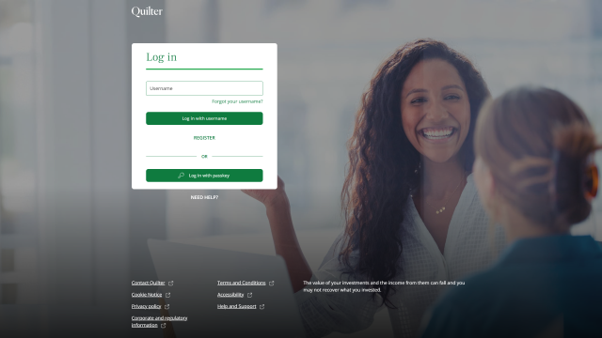
You'll see this login page when accessing the online Customer Centre.
Quilter app
- Open the Quilter app. You may be prompted to download a new version of the app. If so, follow the instructions to update it, then reopen the app before continuing.
- Enter your existing username and password. If you normally use Face ID or fingerprint recognition to log in, you’ll still need to enter your username and password on this occasion.
- Complete any verification steps if prompted.
- Complete the verification steps.
- Review and accept any updated terms and conditions if prompted.
- Continue using the app as normal. If you've already set up Face ID, fingerprint recognition or another device login method, this will continue to work.
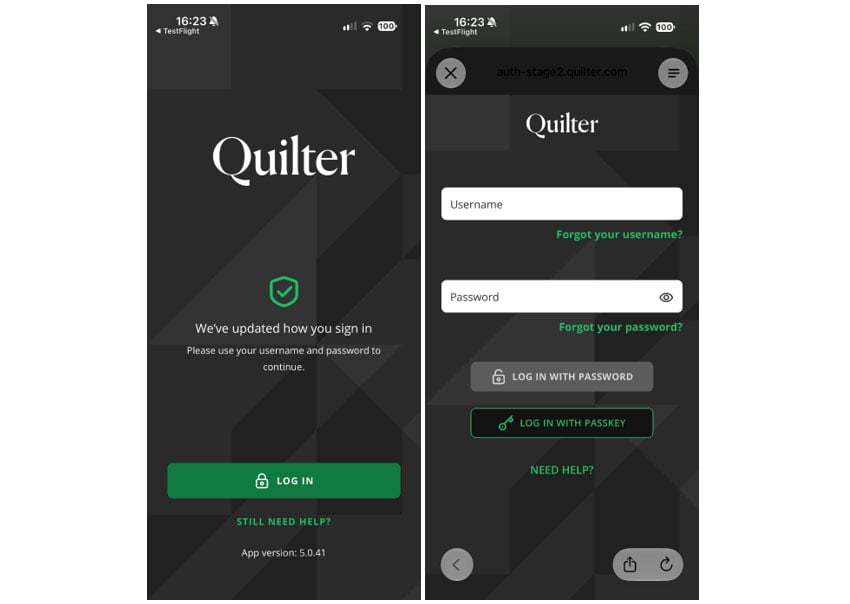
You'll see this login page when accessing the app.
Even quicker access with passkeys
You now have the option to set up a passkey, making logging in quicker and easier.
Once a passkey is set up, you won’t need to wait for a text message or enter a one-time code each time you log in. Passkeys can be particularly useful when accessing your account through a web browser on a desktop, laptop or tablet.
If you use the Quilter app, you can continue to use the security features built into your device, such as Face ID or fingerprint recognition, to access your account.
What is a passkey?
A passkey is an industry-standard way of logging in that removes the need to repeatedly type passwords or login codes. Many well-known organisations already use passkeys as part of their everyday login process.
Instead, you log in using the security already built into your computer or mobile device, such as Windows Hello, Face ID, fingerprint or a device PIN, allowing you to log in quickly and securely. This is particularly useful if you are using your desktop, laptop or tablet browser rather than the Quilter app.
How do I set up a passkey?
Once you have successfully logged in:
- Go to the ‘My details’ tab.
- Click the ‘Manage Security Details’ button.
- Select ‘Add a passkey’ and follow the instructions shown on your device.
- A one-time passcode is sent via text message to your registered mobile number – enter this code online.
- Follow the prompts specific to your device and you’ll be all ready to start using your passkey.
You’ll still be able to use your username, password, and one-time passcode to your mobile as verification if you prefer.
Helpful questions and answers
We've introduced an enhanced login experience for the online Customer Centre and Quilter app. It provides a simpler and more secure way to access your account, while making it easier to use Quilter's online services.
These changes were introduced as part of our ongoing programme of security improvements. They were designed to provide stronger protection for your account, while making it easier to access Quilter's online services.
Online Customer Centre: Go to the online Customer Centre and enter your existing username and password. You'll be guided through any required verification steps and asked to review and accept updated terms and conditions before continuing.
App: Open the Quilter app and enter your existing username and password. You'll be guided through any required verification steps and asked to review and accept updated terms and conditions before continuing.
Passkeys provide a quicker and more secure way to log in. Once set up, you'll be able to use the security features already built into your device instead of entering a password and one-time passcode sent to your mobile device each time you log in. View our passkey guide for more information.
Passkeys use the security features already built into your device, such as Face ID, fingerprint recognition, Windows Hello or a device PIN, to verify your identity and log you in securely. View our passkey guide for more information.
No. For a quicker log in experience, setting up a passkey is recommended but is optional. You can log in using your username, password and one-time passcode if you prefer.
You’ll notice a new-look log-in experience when accessing the online Customer Centre and Quilter app. The new login dashboard still features Quilter branding and secure authentication. See the screenshots above to view the new login experience.
The way you access the Quilter app will remain largely the same, but you'll find a refreshed login experience.
No. These changes only affect the way you log in. Your account information and settings will remain the same.
You'll continue to use your username and password when logging in, unless you choose to set up a passkey. If you use a passkey, you won't need to enter a one-time passcode by text message each time you log in. If you don't use a passkey, you'll continue to log in using your username, password and one-time passcode.